What is OAuth and what can it do? How does it work?
What is OAuth?
OAuth is an open standard for authorization between systems. It lets an application obtain a token to access a user’s resources from another system without ever knowing the user’s password. Instead of forcing third-party apps to store login credentials, OAuth lets users grant access directly, and the app receives an access token that represents that permission.
What is OAuth used for?
Examples include Google Calendar, Google Drive, and Gmail.
For example, imagine Outlook on Windows trying to access Gmail. Instead of giving Outlook your Google password, you log in to Google and grant Outlook permission to create, edit, or delete mail on your behalf.
The application needs to use Google’s API to interact with those resources, and it needs a token to define exactly what it is allowed to do. OAuth provides a way to get that token in a few steps.
We’ll walk through OAuth 2.0, the standard that replaced version 1.0. Version 1.0 was secure but much more complicated to implement.
Client-side flow in JavaScript:
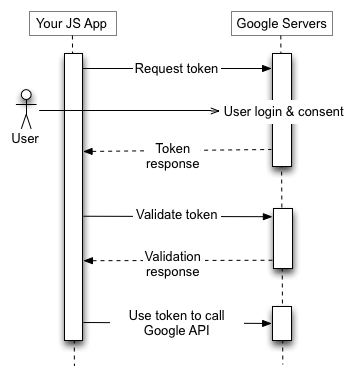
Steps:
-
First, when a user opens an app that needs Google resources, the app sends an
Authorization requestto Google’s servers. The request includes which user and which resources it wants to access. -
The user logs in to Google so Google can authenticate their identity.
-
After login, Google shows the permissions the app is asking for, and the user confirms the access.
-
Google then sends back an
Authorization code(also called anexchange code) as proof that the user granted access. This code is only used to continue the flow; it does not give direct resource access by itself. -
The app exchanges the
Authorization codefor anaccess token, which is the token it will use to access resources. -
Once the app has the
access token, it can call APIs and act within the permissions the user granted.
Terms:
-
Authorization request: a request asking for permission to access the resources the app needs.
-
Authorization code (exchange code): proof that the user granted permission. It is not the token used to access resources.
-
Access token: the token the application uses to access resources.
-
Resource Owner: the user.
-
Client: the third-party application or website.
-
Authorization Server: the server that issues tokens, such as Google’s OAuth server.
-
Resource Server: the server that hosts the resources, such as the Google Drive API or Gmail API.
Notes:
-
Authorization and Authentication are different.
-
Authorization is granting permissions. Authentication is verifying identity.